PDF/XPS Exporter for Internet Explorer2.1
Publisher Description
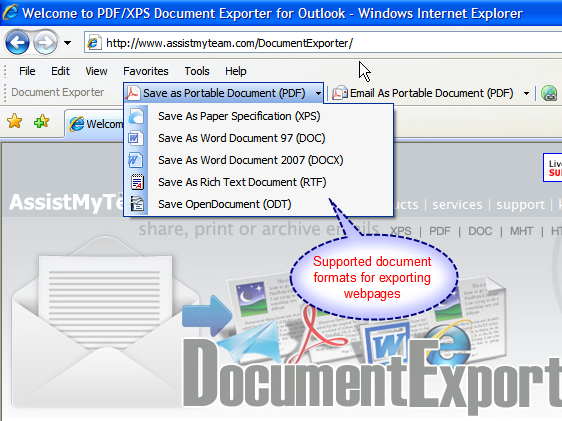
Document Exporter for Internet Explorer brings PDF, XPS, DOC and other widely used formats to the most popular Internet browser ever, enabling you to save web pages to one of this supported document type or simply attach to your Microsoft Outlook emails in a single click. Whichever format you export, Document Exporter preserves all the inline/embedded images, hyperlinks and make textual contents editable in the generated documents. Supports Internet Explorer version 7 and above. No PDF printer or Adobe Acrobat drivers required.
Microsoft Office 2007 applications can now save documents to PDF/XPS. Unfortunately, Microsoft Internet Explorer is not part of the Office suite, and is still devoid for support of PDF/XPS and other popular format. So, as usual, most of us has to either rely on Adobe Acrobat plugin (which cost a lot, you will have to buy it) or, simply copy-paste the content of the web page to Microsoft Word and convert to PDF/XPS. Document Exporter is designed to bridge this gap by bringing the PDF/XPS supports in Internet Explorer.
About PDF/XPS Exporter for Internet Explorer
This Browsers program is available in English. It was last updated on 29 September, 2026. PDF/XPS Exporter for Internet Explorer is compatible with the following operating systems: Windows.
The company that develops PDF/XPS Exporter for Internet Explorer is AssistMyTeam. The latest version released by its developer is 2.1. This version was rated by 1 users of our site and has an average rating of 3.0.
The download we have available for PDF/XPS Exporter for Internet Explorer has a file size of 3.1 MB. Just click the green Download button above to start the downloading process. The program is listed on our website since 2011-08-30 and was downloaded 368 times. We have already checked if the download link is safe, however for your own protection we recommend that you scan the downloaded software with your antivirus. Your antivirus may detect the PDF/XPS Exporter for Internet Explorer as malware if the download link is broken.
How to install PDF/XPS Exporter for Internet Explorer on your Windows device:
- Click on the Download button on our website. This will start the download from the website of the developer.
- Once the PDF/XPS Exporter for Internet Explorer is downloaded click on it to start the setup process (assuming you are on a desktop computer).
- When the installation is finished you should be able to see and run the program.
